
Low-Code Workflow Builder
Using the Low-Code Workflow Builder
Starting in v6.1.6, the Kinetic Platform introduces a low-code workflow builder experience that makes it easier to configure workflows without requiring users to write code upfront.
This enhancement is designed to help builders focus on what data a workflow needs and how it should behave, while the platform handles the underlying syntax automatically.
Why This Matters
Historically, configuring workflow parameters required working directly with Embedded Ruby (ERB). While powerful, this meant users were often introduced to code before fully understanding how data flows through a workflow.
The low-code workflow builder changes that experience by:
- Providing a guided way to select available data
- Reducing the need to write or memorize syntax
- Making workflows more approachable for business and technical users alike
Advanced configuration is still fully supported but no longer required to get started.
What Is the Low-Code Workflow Builder?
The low-code workflow builder enhances how parameters are configured on workflow nodes.
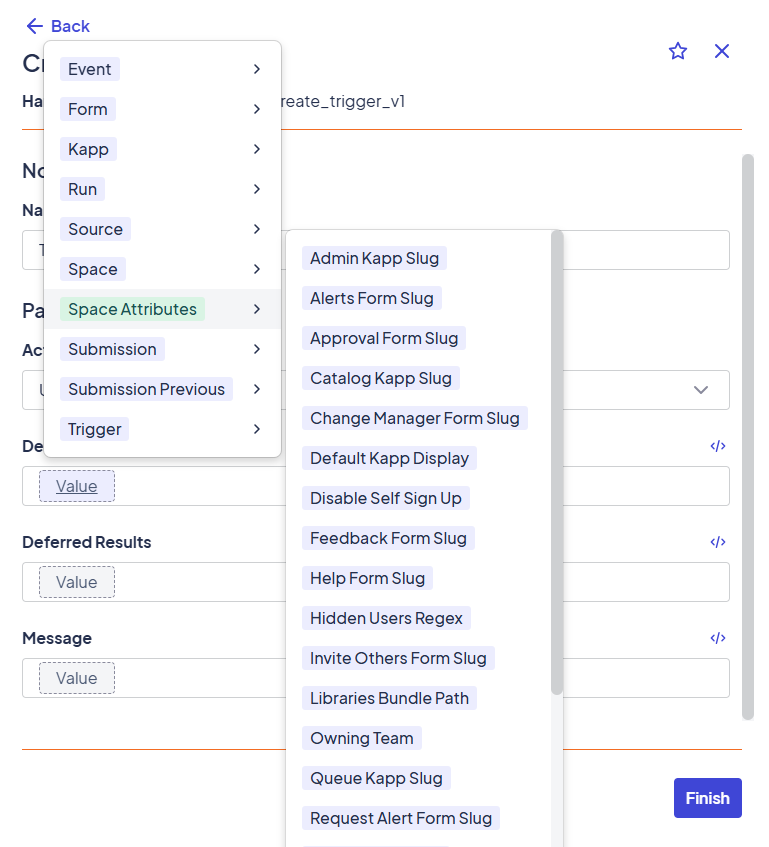
Instead of immediately writing ERB expressions, builders can now:
- Browse available data sources (form values, submission metadata, previous results)
- Select the desired value using a guided interface
- Let the platform generate the underlying expression automatically
This allows users to build correct, functional workflows faster with less risk and less guesswork.
What Types of Data Can Be Selected?
Using the low-code parameter selector, builders can choose from common workflow inputs, including:
- Form question values
- Submission metadata (ID, timestamps, status)
- User information (when applicable)
- Outputs from previous workflow steps
- Space, kapp, and form attributes
These selections are context-aware and limited to values that are valid for the current step.
Low-Code vs. Embedded Ruby (ERB)
The low-code builder does not remove or limit advanced capabilities. Instead, it provides a progressive path.
| Use Case | Recommended Approach |
|---|---|
| Passing form values into a step | Low-code selector |
| Referencing submission metadata | Low-code selector |
| Branching workflow logic | Connectors + low-code |
| Complex string manipulation | Embedded Ruby |
| Advanced calculations or conditions | Embedded Ruby |
Builders can always switch to manual editing when needed.
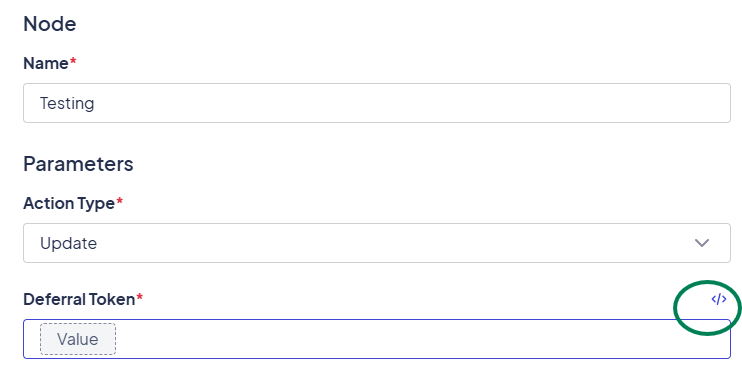
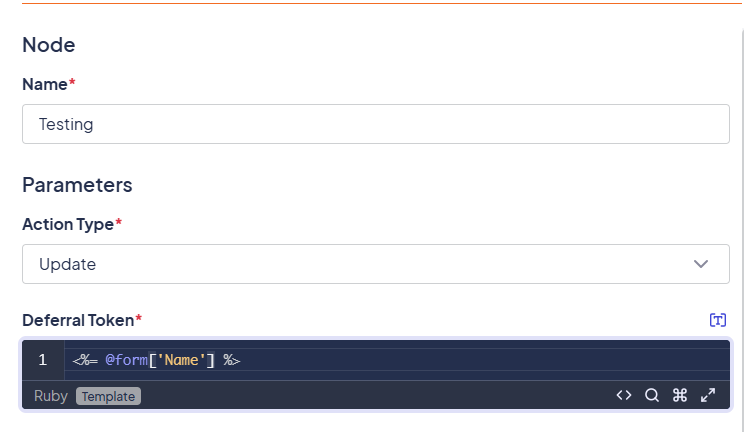
What Happens Behind the Scenes?
When a value is selected using the low-code builder, the platform generates the corresponding Embedded Ruby expression automatically.
This means:
- Workflows still execute using the same engine
- Advanced users can understand or modify generated expressions if desired
- Existing workflows continue to work unchanged
The low-code experience improves usability without altering how workflows function at runtime.
How This Fits Into the Workflow Experience
This enhancement works alongside existing workflow concepts:
- Workflow Overview explains what workflows are and how they're structured
- Low-Code Workflow Builder shows how data is selected and configured
- Using Parameters and Dynamic Data provides a deeper look at ERB and runtime behavior
Together, these pages support both new builders and experienced developers.
Learn More
To understand how parameters and dynamic values behave behind the scenes, see:
Updated 10 months ago